Workflow Design
Gemini — Digital Twin
Designed a multi-role approval workflow that eliminated status uncertainty across 4 engineering roles on a B2B digital twin platform. The core challenge was surfacing complex data lifecycle states across time zones and specialisms — making each role's required action immediately visible without synchronous handoffs.
Turned a fragmented, email-driven review process into a single auditable approval surface.
Gemini is a digital twin platform developed at Infineon to support power module customization, simulation, and engineering approval workflows. Field Application Engineers used the system to configure modules, capture customer requirements, simulate circuit behavior, and submit projects for feasibility and prototyping review.
Before Gemini, this process was fragmented across local tools, Excel sheets, email approvals, and long stakeholder conversations.
My Role
- Defined the first functional MVP workflow (“Short Flow”)
- Mapped the multi-role approval flow
- Designed interaction models for module status
- Planned UI for module customization and submission
- Validated workflow through user testing
Outcome
The Short Flow MVP was launched to 20 FAEs in China (Shanghai and Shenzhen). The new workflow centralized requirement capture inside Gemini, introduced visible approval states, reduced reliance on email, and provided real-time status visibility for all stakeholders.
A System That Looked Complete — But Wasn't Usable
What existed
- Module catalog browsingEngineers could browse and filter from the full product catalog
- 2D / 3D visualizationReal-time dimensional rendering for physical validation
- AR previewSpatial overlay to verify modules on physical board configurations
- Schematic editor placeholdersReserved UI zones for planned schematic tooling
What was missing
- Capture requirementsNo structured way to define customer scope before module selection
- Attach modules to projectsCatalog entries existed in isolation — no link to project context
- Submit modules for approvalApprovals routed through email with no system-level tracking
- Track feasibility progressStatus arrived via manual follow-up, no single source of truth
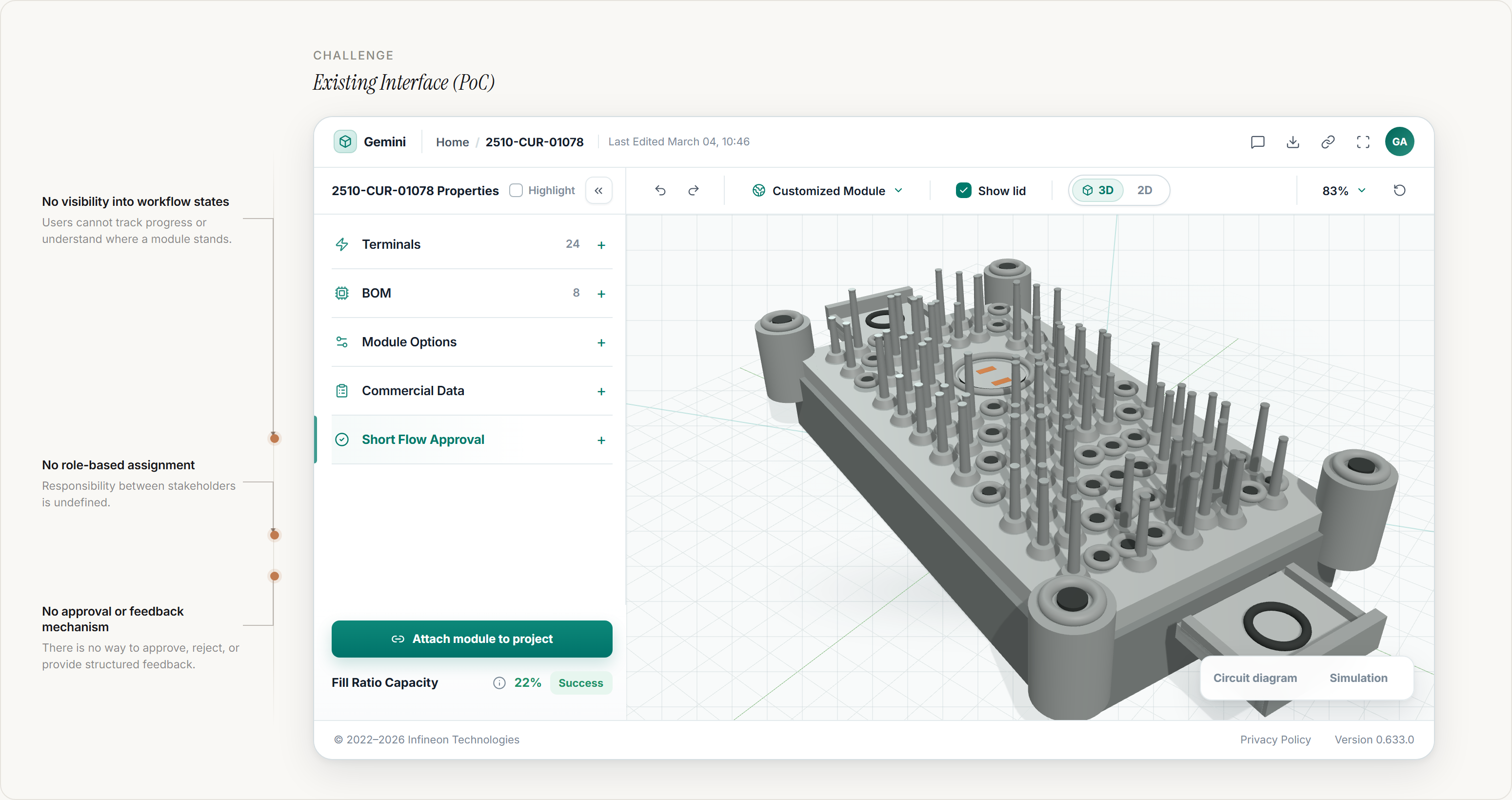
The platform supported module visualization, but lacked the workflow infrastructure required for collaboration, approvals, and execution.
Governance Complexity
The approval process involved several engineering roles, creating governance complexity around ownership, feedback, permissions, and next steps. Approvals happened at the module level rather than the project level.
| FAE | captures customer requirements and submits modules |
| PAE | performs technical feasibility assessment |
| PMG | conducts commercial evaluation |
| PJM | manages design specification and production integration |
Ownership and permission model
FAE / requester
- Owns the module draftCaptures requirements and edits the module before submission
- Receives rejected modulesA negative review returns ownership and unlocks the module for revision
- Acts on visible feedbackReviewer comments and the next action remain attached to the module
Review roles
- Self-assign before actingPAE and PMG make responsibility explicit before review actions are enabled
- Review a locked moduleThe module becomes read-only during review to prevent conflicting edits
- Expose the current ownerThe responsible role or person is shown alongside the workflow state
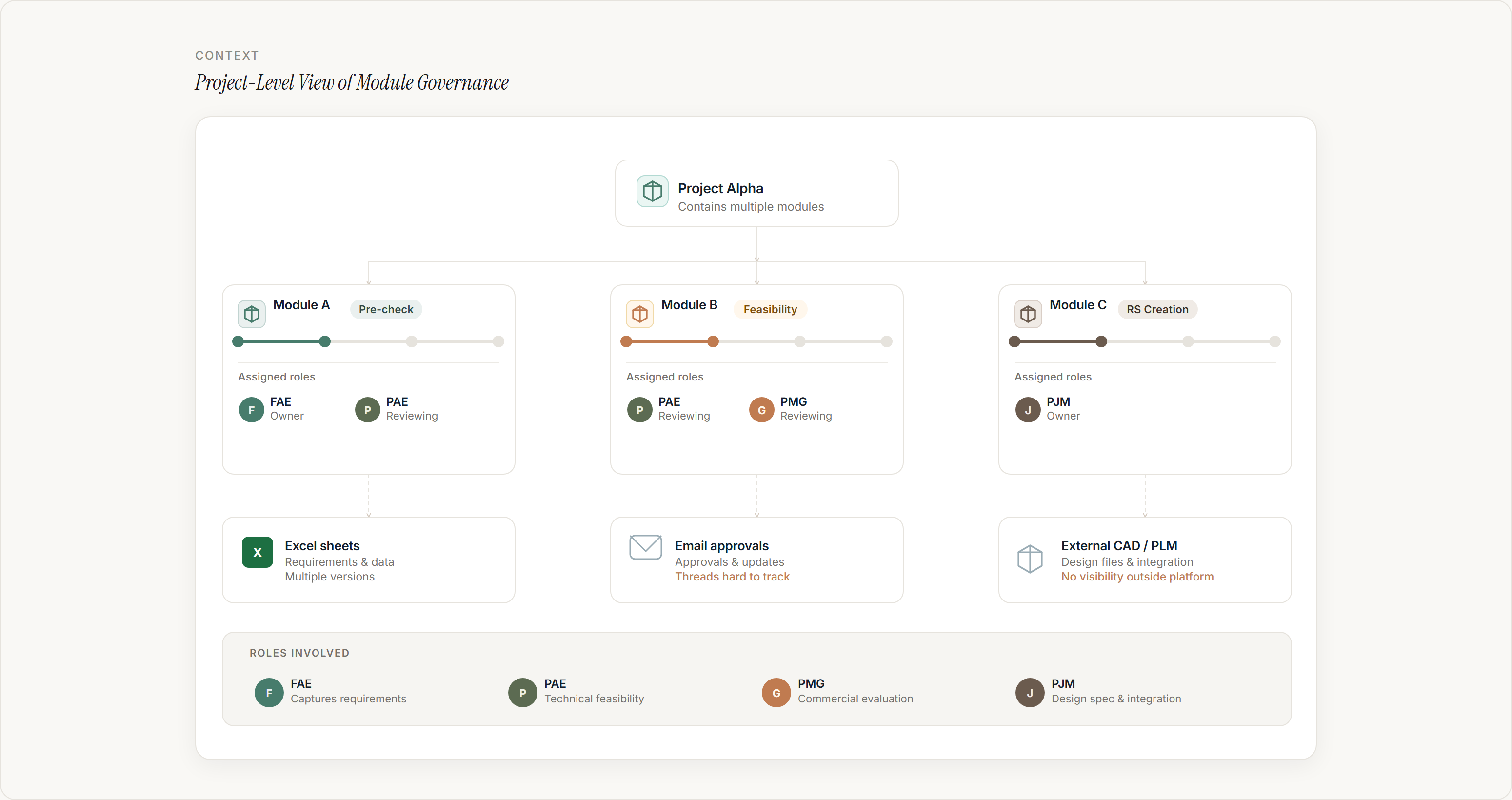
Without a shared governance layer, teams could review modules, but they could not clearly track ownership, feedback, permissions, or what needed to happen next.
The Key Insight
Interviews with FAEs across China, Germany, Austria, and Japan revealed the same pattern. The primary challenge was not module customization — it was status uncertainty.
After submission, FAEs often lost clarity on:
- Who currently owned the module
- Whether editing was allowed
- What approval stage it was in
- What action was required next
The UX challenge was to make workflow states, ownership, and next actions visible inside the system.
Designing Visibility Across the Short Flow
The key design question was how to make module progress, ownership, permissions, and next actions visible without adding unnecessary complexity to the interface. We explored three approaches to represent workflow state and responsibility.
Full Workflow Timeline
A timeline showing the complete lifecycle from Draft to Production.
Made the end-to-end approval process visible.
Consumed too much space and became difficult to scan when users managed multiple modules.
Activity Feed
A chronological log of decisions, comments, and stakeholder actions.
Supported traceability and helped explain what had happened.
Required users to read through history before understanding the current state and ownership.
Compact State Indicators
Small module-level indicators showing the current workflow state.
Supported fast recognition across module lists, tables, and detail pages.
Needed additional cues for ownership, permissions, and rejection feedback.
The final direction combined compact workflow states with contextual ownership, editability, and feedback cues — helping users understand module progress, responsibility, allowed actions, and next steps without leaving the module view.
Designing the Short Flow Lifecycle
To address status uncertainty, we designed Short Flow — a structured approval lifecycle that translated the engineering review process into visible system states.
Each state mapped to a specific review stage and appeared directly in the module interface, helping users understand progress without relying on email or manual follow-ups.
Short Flow was not just a UI tab. It was a role-based workflow model that made ownership, review state, editability, permissions, and next actions visible at module level.
Key Interaction Decisions
Designing the Workflow Grammar
We treated workflow visibility as a connected system rather than a single status label. Each module needed to communicate five separate pieces of information that changed together as work progressed.
- Stage showed where the module was in the Short Flow lifecycle
- Status showed the current review outcome or condition
- Owner showed who was responsible for moving the module forward
- Permission showed whether the module could be edited or reviewed
- Next action translated the current state into a clear task
Role-Based Self-Assignment
During Pre-check and Feasibility, progress depended on input from both PAE and PMG. When roles were not assigned, ownership became unclear and modules stalled. To reduce this ambiguity, we introduced self-assignment inside Short Flow.
- If no assignee exists, the primary CTA is “Assign to me”
- Once assigned, the module state updates to Assigned
- Approval, rejection, and comments are enabled only for assigned users
Parallel Pre-check Decision Rule
Pre-check required both technical input from PAE and commercial input from PMG. The workflow made their parallel decisions visible and converted the combined result into one clear module-level outcome.
- PAE and PMG reviewed the module in parallel
- Two positive results allowed the module to progress
- Any negative result returned the module to the FAE
- The module unlocked for revision and the requester was notified
- Reviewer feedback remained visible and actionable inside the module
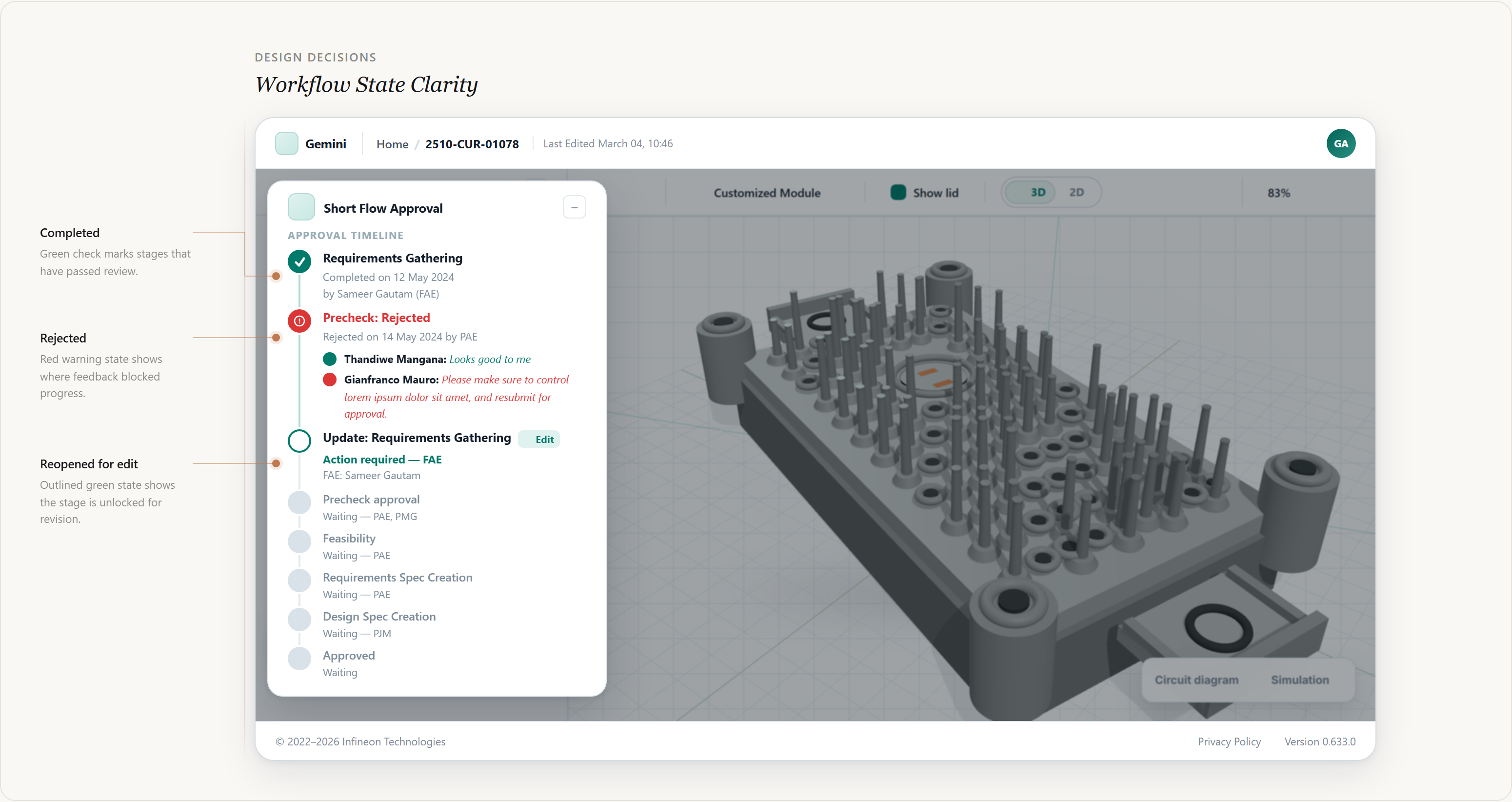
Designing State Clarity
To make module progress scannable, each module displayed a persistent status badge combining color, icon, and text label. This made the state understandable without relying only on color, and kept status indicators consistent across module pages, project overview tables, and workflow notifications.
Visualizing Ownership and Editability
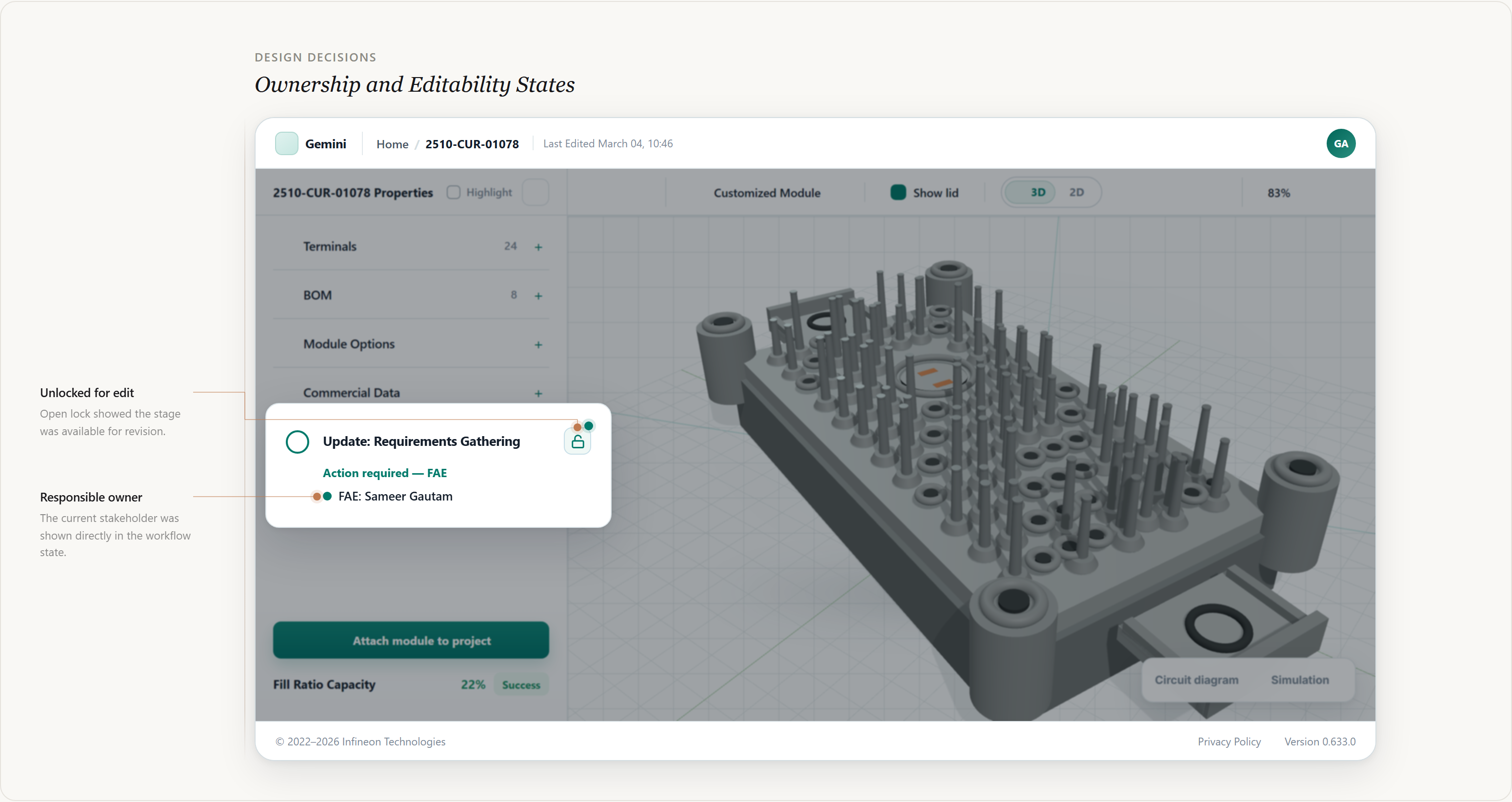
During review, editing needed to be restricted to prevent version conflicts. Instead of silently disabling controls, the interface explained why the module was read-only and who currently owned the next action.
- Editing became read-only
- A lock icon appeared in the interface
- The responsible stakeholder was shown
- The UI explained why editing was disabled
Structured Rejection Feedback
Previously, rejection feedback arrived through email conversations, forcing FAEs to interpret comments and track required changes manually. In Gemini, rejection was integrated directly into the module workflow.
- The module state changed to Rejected
- Feedback appeared inside the module view
- Users were guided toward Revise & Resubmit
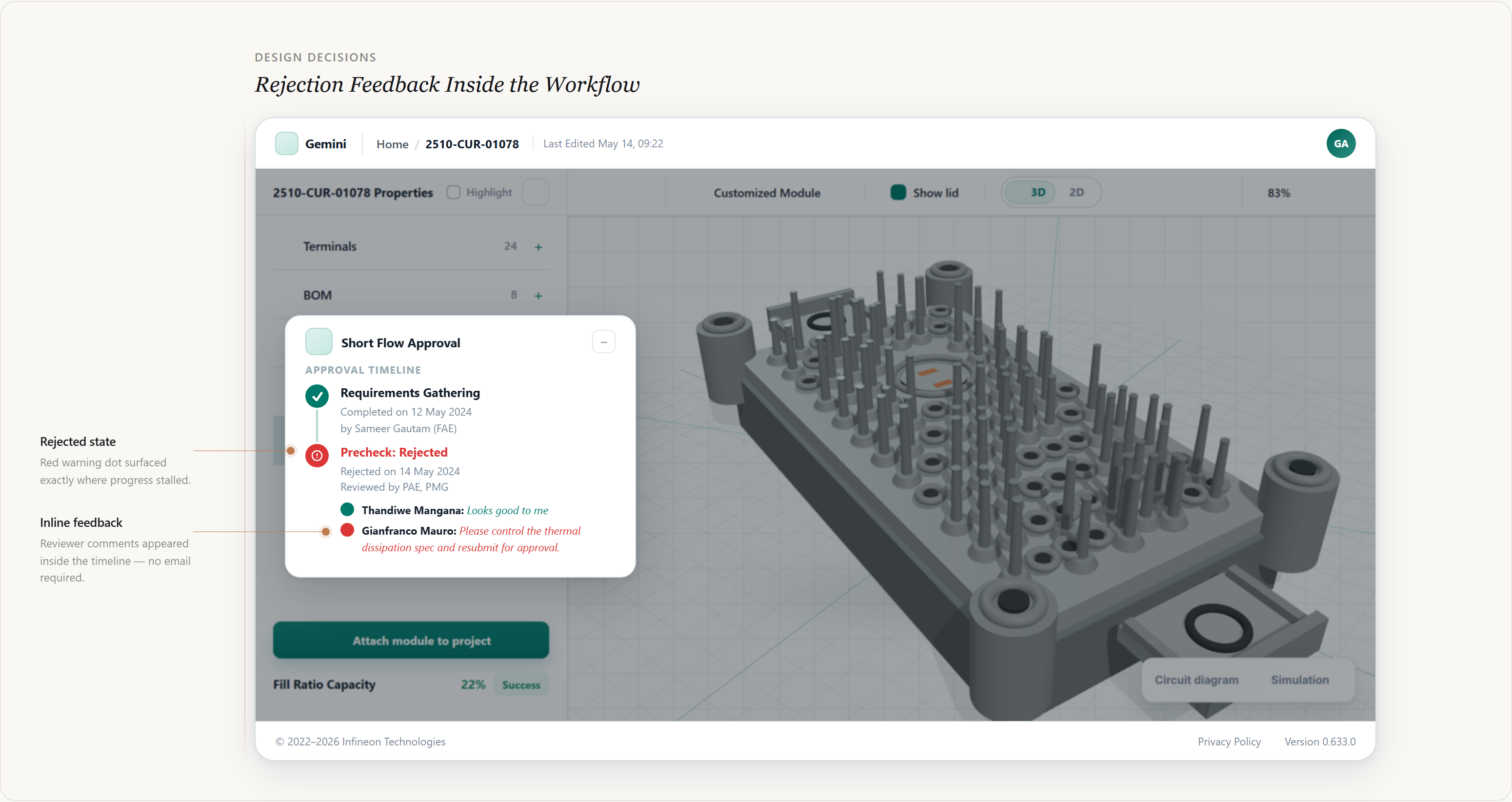
Together, these decisions turned Short Flow into an actionable workflow layer — making state, ownership, editability, and rejection feedback visible inside the module interface.
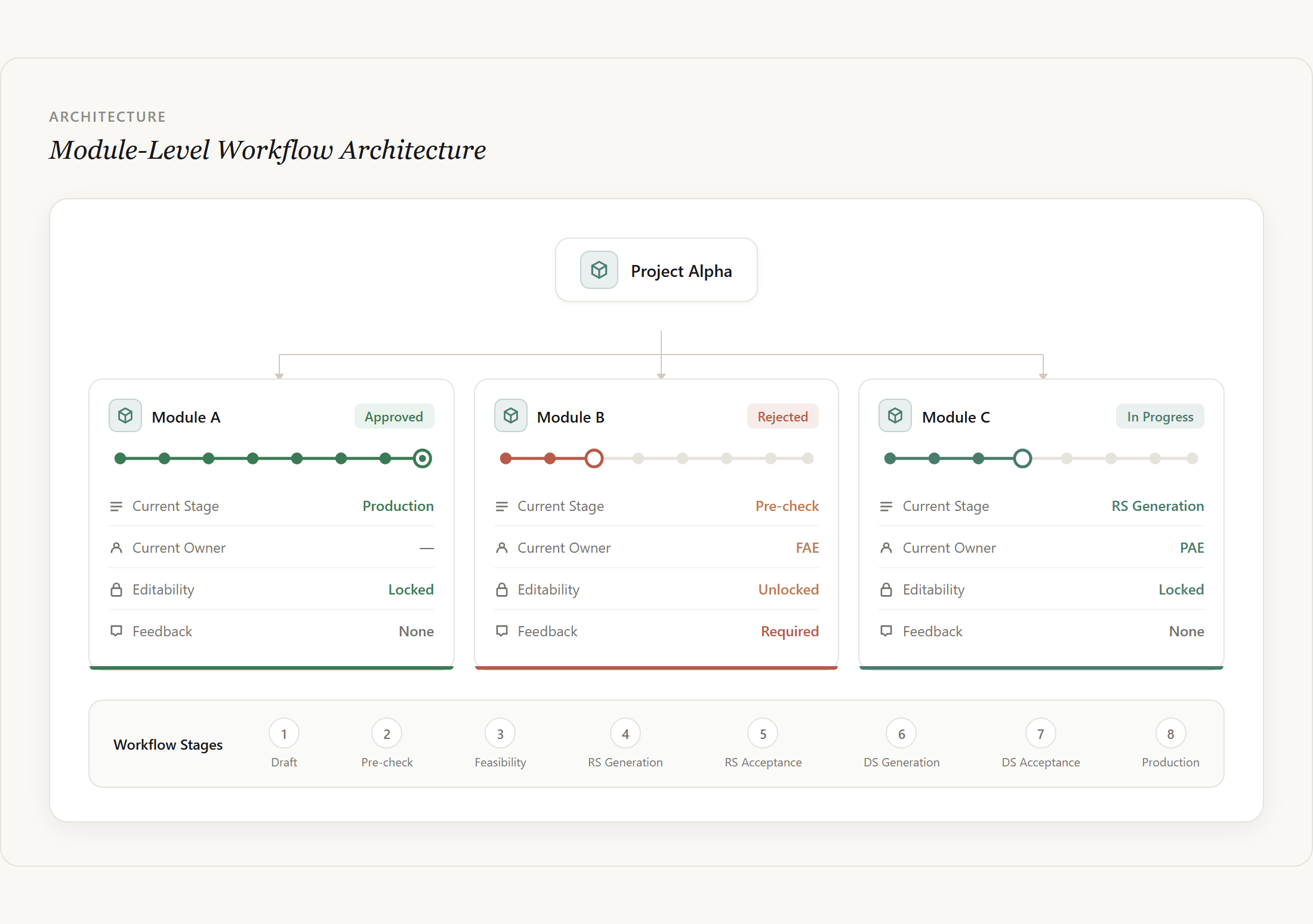
Module-Level Workflow Architecture
The approval workflow in Gemini was designed at the module level, while each module remained part of a broader project structure.
Because a single project could contain multiple modules, each module needed to move through Short Flow independently — with its own status, owner, editability, and feedback state. This prevented one delayed or rejected module from blocking the entire project.
Project-to-Module Interaction
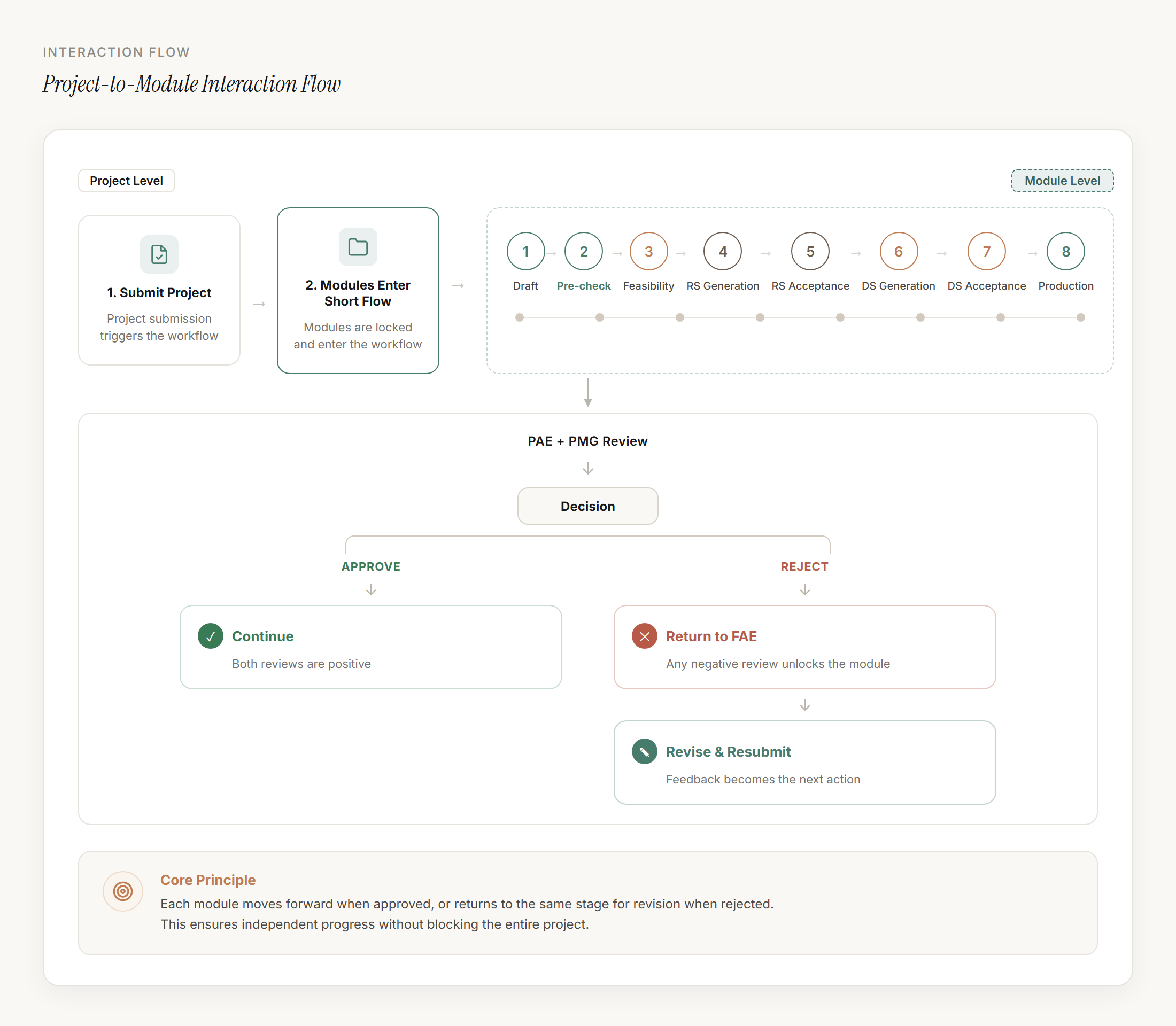
Project submission was triggered at the project level, while review and evaluation happened at the module level.
Once submitted, modules entered Pre-check as read-only items. PAE and PMG reviewed each module in parallel. Two positive results allowed progression; any negative result returned the module to the FAE, unlocked it for revision, notified the requester, and surfaced the feedback as the next actionable step.
User Acceptance Testing
We conducted User Acceptance Testing with FAEs from China and Austria before the MVP launch.
Participants completed core Short Flow tasks, including creating module drafts, customizing module parameters, attaching modules to a project, and submitting modules for review.
The sessions helped validate whether users could understand the workflow state, identify their responsibilities, and complete review-related actions without relying on external email updates. Feedback led to refinements in icon placement, status communication, and interaction clarity before launch.
Before and After
Before Gemini, FAEs tracked module feasibility through email conversations with engineering teams. Status updates, ownership, and rejection feedback were spread across multiple messages and tools.
Before Short Flow
- Status tracked through emailNo visibility inside the product — engineers relied on inbox threads
- Ownership unclearNo system indicator of who was responsible for the next action
- Feedback scattered across toolsRejection notes arrived separately, disconnected from the module
- Manual follow-ups requiredFAEs had to chase engineering teams to learn review outcomes
After Short Flow
- Status visible in the productApproval stage surfaced directly inside the module interface
- Responsible owner shownAssigned reviewer always visible alongside the current module state
- Feedback attached to workflow stateRejection comments appeared in context, linked to the relevant module
- Next action clearGuided CTAs showed what to do next based on the current state
This reduced coordination overhead, made ownership clearer, and removed the need for manual status inquiries during the review process.
Next Project
A Design System Built for Scale
Systems Design